
Scam Detection Module
The scam detection module (id: scam-detection, configuration class: ScamDetection) has a few features that can be used to detect potential scams, and temporarily time-out the user, pending moderator verification.
Image content scam detection
The module can scan the content of attachments using Optical Character Recognition. Image text will be tested against the provided regular expressions, and if a match is found, the message is flagged as a potential scam. 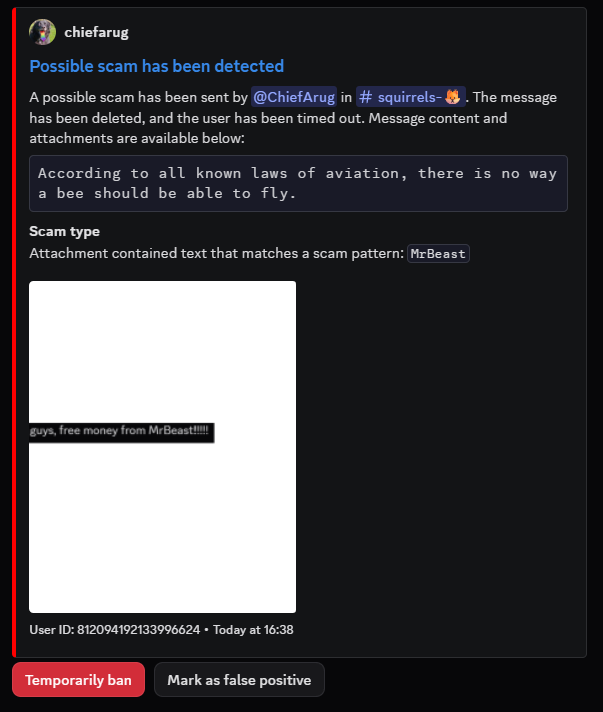
WARNING
While the module itself is light on memory and CPU consumption, OCR is not.
For accuracy, all images sent in your server will be upscaled by a factor of 3 and then run through tesseract-ocr serially.
This will incur a significant memory and processing cost that you should account for.
Bot Permissions
The following bot permissions are required by this module: Kick Members, Ban Members, Time out Members, Manage Messages.
The following intents are required by this module: Message content.
This module does not require permanent data storage.
Plug&Play Scam Detection
A Docker Compose file that deploys only OCR-based scam detection is available below. You only need to configure the environment variables at the top of the file, and modify the memory and CPU limits as required.
# Plug&Play Docker Compose configuration for Camelot's OCR-based scam detection.
# For more information, visit https://camelot.rocks/modules/scam-detection.html

services:
  camelot:
    image: ghcr.io/neoforged/camelot:latest
    environment:
      # The token of your bot, obtained from the Discord Developer Portal
      BOT_TOKEN:
      # The ID of the channel in which to log potential scams
      SCAM_LOGGING_CHANNELS:
      # The regular expressions against which to test image text content. One per line. Use https://regex101.com/ to test your patterns.
      OCR_SCAM_PATTERNS: |
        (?i)example\spattern1
        another.*pattern

    # Update the limits below as you see fit
      JVM_OPTS: -Xmx4G
    deploy:
      resources:
        limits:
          cpus: 4
          memory: 4GB

    configs:
      - source: camelot.groovy
        target: /home/camelot/camelot.groovy

configs:
  camelot.groovy:
    content: |
      camelot {
          token = secret(env('BOT_TOKEN'))

          eachModule { enabled = false }
          module(ScamDetection) {
              enabled = true
          }

          guildConfiguration {
              forAnyGuild {
                  modules."scam-detection" = {
                      logging_channels = env('SCAM_LOGGING_CHANNELS').trim().split('[,\n]').collect {it.trim() as long}

                      image_scams = {
                          enabled = !(System.getenv('OCR_SCAM_PATTERNS') ?: '').isBlank()
                          patterns = System.getenv('OCR_SCAM_PATTERNS')?.trim()?.split('\n') ?: []
                      }
                  }
              }
          }
      }
INFO
If you intend to use more features of the bot or configure it through Discord, you will have to set it up normally (and persist its data storage folder).